







 Purchase this item and get
 Microsoft Visio Professional 2024 – License Comparison
| License | Retail | OEM |
|---|---|---|
| Bound to Microsoft Account? | ✅ Yes | ❌ No |
| Transferable to Another PC? | ✅ Yes | ❌ No |
| Validity / Subscription | One-time / Lifetime | One-time / Lifetime |
| Can be redeemed on setup.office.com | ✅ Yes | ❌ No (Redeem from the software only) |
| Works after hardware changes? | ✅ Yes, remains activated | ❌ No, activation is lost |
Microsoft Visio Professional 2024 is designed for business analysts, IT professionals, project teams, and engineers. This offer supports Windows 10/11 and is supplied under a OEM or Retail according to the selected option. Before checkout, confirm the selected edition, device allowance, system compatibility, and delivery details shown on this page.
Why Choose Microsoft Visio Professional 2024?
Microsoft Visio Professional 2024 gives business analysts, IT professionals, project teams, and engineers a clearly defined way to obtain the software for Windows 10/11. The right buying decision depends on the tasks you need to complete, the exact license terms, the supported operating system, and the number of devices covered – not on the product name alone.
The Microsoft Visio Professional 2024 offer for Windows 10/11 states a OEM or Retail according to the selected option. Its device scope is: Confirm the selected device allowance. Review those exact terms before payment, particularly when replacing an older edition, moving to a new computer, or buying for business use.
What You Will Receive
- ✅ Product key
- ✅ Download links
- ✅ Full installation instructions
- ✅Certificate of legality
Practical Workflows for Microsoft Visio Professional 2024
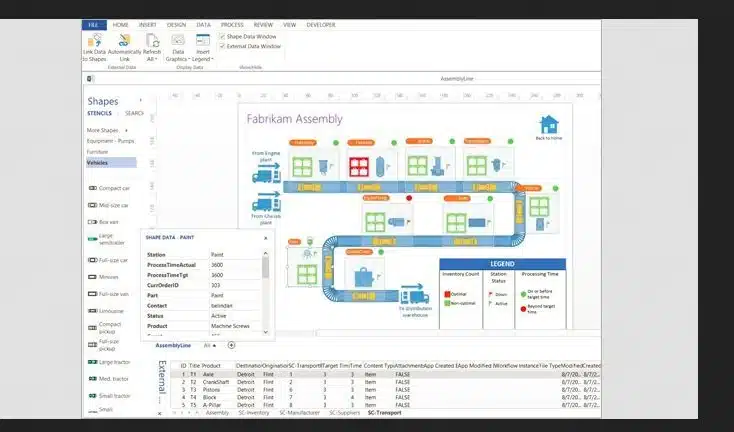
flowcharts and process maps
network and organization diagrams
professional templates and shapes
data-connected diagram workflows where supported
Microsoft Visio 2024 Professional – Key Features
Microsoft Visio Professional 2024 is a comprehensive diagramming and visualization tool designed to help professionals across various industries create detailed and dynamic diagrams with ease. Below are the key features that make Visio Professional 2024 a valuable asset for businesses and IT professionals
-
Ready Templates: Create flowcharts, org charts, network maps & more with drag-and-drop ease.
-
Live Collaboration: Work with your team in real time via Teams & SharePoint.
-
Data-Linked Diagrams: Connect to Excel or SQL — diagrams update automatically.
-
Professional Designs: Use clean, modern templates that match your brand.
-
Smart Editing: Change shapes without breaking your layout.
-
Cloud Access: Open and edit diagrams anywhere, even on mobile.
-
Enterprise-Grade Security: Built-in Microsoft 365 protection.
For more details you can refer to Microsoft official guideline
Who Is This License Best For?
This product is a strong fit for business analysts, IT professionals, project teams, and engineers. It is especially useful when you need flowcharts and process maps, network and organization diagrams, and license terms that match the offer described on this page.
Microsoft Visio Professional 2024 is not the correct choice when the required platform, device rights, deployment method, or administration features are absent from this offer. Business buyers should document the intended users and devices before activating this specific edition.
Compatibility and Purchase Checklist
Platform required for Microsoft Visio Professional 2024: Windows 10/11.
License supplied for Microsoft Visio Professional 2024: OEM or Retail according to the selected option.
Device scope for this offer: Confirm the selected device allowance.
Confirm that the computer intended for Microsoft Visio Professional 2024 meets the vendor requirements.
Decide whether Microsoft Visio Professional 2024 will be installed fresh, used as an upgrade, or activated on an existing compatible installation.
Delivery and Activation for Microsoft Visio Professional 2024
Install Microsoft Visio Professional 2024 using the supplied Visio 2024 instructions and activate the OEM or Retail option selected at checkout. Match the 32-bit or 64-bit installation architecture to the existing Office setup when both products share the same device.
If Visio installation conflicts with Office, check the Click-to-Run architecture and product channel before reinstalling. Send support the Office version, architecture, Visio edition, and error code so the conflict can be diagnosed accurately.
Is Microsoft Visio Professional 2024 the Right Option for You?
Choose Microsoft Visio Professional 2024 for professional diagramming on Windows, not as a replacement for the main Office suite. Confirm that the Visio edition and installation architecture are compatible with any Office installation already on the computer.





Daniel M. –
I accidentally bought the OEM version, but I actually needed the Retail version so I could link it to my Microsoft account. I contacted support through the live chat, and they exchanged the product for me free of charge. Really impressed with the customer service!
Wow, thank you very much! Definitely appreciated